
Affordable POS for Events: The Complete Australian Guide
Affordable POS for events: compare costs, offline mode, and multi-device support. See why Evntle is Australia's best event POS. Start free today.
Summary
Affordable POS for events: compare costs, offline mode, and multi-device support. See why Evntle is Australia's best event POS. Start free today.
Affordable POS for Events: The Complete Australian Guide
Affordable POS for events means a system that handles tap-to-pay sales, offline mode, multi-device syncing, and live reporting without charging per-terminal fees that eat vendor margins. For Australian market and festival organisers, the best affordable POS for events is one platform that connects stallholder bookings, payments, stock, and analytics — so you're not paying for five separate tools. Evntle POS delivers this from $0 to set up, with offline mode, multi-device support, and live sales visibility across every stall.
Here's the thing about event day: your vendors don't care about your software stack. They care about whether the EFTPOS terminal works when the queue is 12 deep and the mobile signal drops. They care about whether their stock counts are right at the end of the day. And you care about whether you can see, in real time, which stalls are actually selling.
That's the real test of affordable POS for events — not the monthly fee, but the total cost of the workarounds you'd need without it.
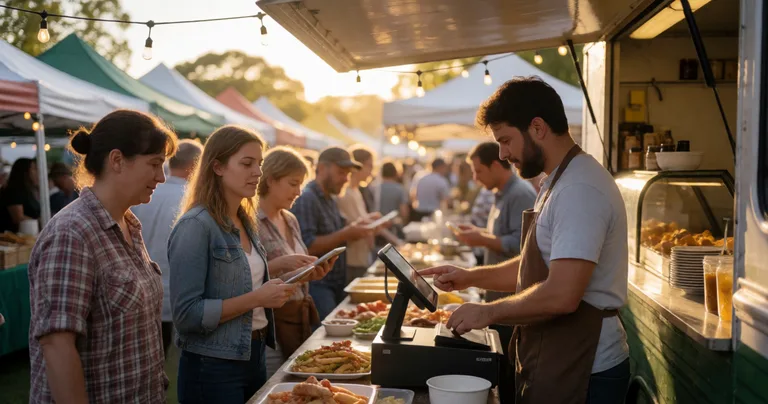
Why Affordable POS for Events Is Different From Retail POS
A standard retail POS assumes four walls, reliable Wi-Fi, and one checkout counter. Event POS has to survive the opposite: temporary sites, patchy 4G, multiple vendors selling simultaneously, and a crowd that expects to tap and go in under 10 seconds.
Here's what makes event POS genuinely different:
- Offline mode is non-negotiable. If your POS can't process sales without internet, you'll lose sales the moment the network congests — and it will congest.
- Multi-device sync matters more than hardware. A food truck, a coffee cart, and a craft stall all need to see the same stock and sales data.
- Setup time is measured in minutes, not days. Vendors arrive at 5am and need to be trading by 7am.
- Reporting has to be stall-level. Organisers need to know which vendors performed, not just total event revenue.
That last point is where most cheap POS systems fall over. They'll take a payment, but they won't tell you which stall made it — which means you can't make smarter site planning decisions next event.
Before you compare POS pricing, calculate your true cost per event. Add up terminal rental, transaction fees, subscription fees, and the admin hours you spend reconciling sales across multiple systems. That number is your real baseline.
What to Look For in an Affordable POS for Events
"Affordable" doesn't mean "cheapest." It means the lowest total cost of ownership for the outcomes you need. Here's the checklist we'd give any Australian market organiser.
Core features that pay for themselves
- Offline-capable payments. Sales continue when the network drops, then sync when it returns.
- Multi-device support. Phones, tablets, and desktops all running the same system in real time.
- Live sales dashboard. See revenue per stall, per hour, across the whole event.
- Allergen tracking. Non-negotiable for food vendors — and increasingly expected by councils.
- Loyalty and repeat-customer capture. Turn a one-off market visit into a regular.
- Integration with vendor management. Applications, site plans, and payments in one platform.
If you're weighing up hardware options, our breakdown of Cashless Terminals Versus Mobile POS for Events is worth reading before you commit to terminals.
Features that sound good but rarely pay off
- Complex loyalty tiers that vendors never configure
- Hardware-locked systems that can't run on a vendor's own tablet
- Per-terminal monthly fees that punish multi-stall operators
- Reporting that only shows totals, not stall-level performance
"The cheapest POS is the one your vendors actually use on event day. Everything else is a spreadsheet waiting to happen."
— Evntle field notes, Victorian farmers market circuit
Comparing Affordable POS Options for Australian Events
Here's how the main options stack up for event organisers and stallholders. We've focused on the factors that actually matter on event day: offline capability, multi-device support, and whether the system understands events at all.
| POS Option | Offline Mode | Multi-Device | Event-Specific Features | Best For |
|---|---|---|---|---|
| Evntle POS | Yes — full offline selling | Yes — phones, tablets, desktop | Stallholder bookings, site plans, vendor analytics, KDS | Markets, festivals, food events |
| Square | Limited offline mode | Yes, per-device setup | None — retail-focused | Solo stallholders, craft sellers |
| Shopify POS | Limited offline mode | Yes, tied to Shopify store | None — retail/ecommerce focused | Vendors with existing online stores |
| Lightspeed | Yes, on supported hardware | Yes, multi-terminal | Limited — food service focus | Established food operators |
| Bank terminal only | Usually no | No | None | Absolute minimum setup |
The pattern is clear: general retail POS tools handle payments but ignore the event layer. Event-specific platforms cost more upfront but eliminate the admin and reconciliation work that eats your margin.
Typical cost breakdown per event day
These are indicative figures based on Australian market and festival operations. Your numbers will vary by vendor count and transaction volume.
| Cost Category | Spreadsheet Approach | Generic Retail POS | Event-Specific POS (Evntle) |
|---|---|---|---|
| Transaction fees (per $10k in sales) | N/A — cash only | $150–$250 | $150–$250 |
| Terminal / hardware rental | $0 | $40–$80 per terminal | $0 — BYO device |
| Admin hours per event (reconciliation) | 6–10 hours | 3–5 hours | Under 1 hour |
| Lost sales from queue drop-off | High — cash only | Moderate | Low — fast checkout |
| Vendor management tools | Separate cost | Separate cost | Included |
According to the Australian Retailers Association, cash now accounts for less than 13% of in-person transactions nationally — and that number drops further at events, where attendees expect tap-and-go. Cash-only stalls are leaving money on the table.
How Evntle Makes Affordable POS for Events Actually Work
Evntle is built specifically for the Australian event market. That means every feature exists because an organiser or vendor asked for it after a bad event day.
For organisers: one platform, not five
Instead of stitching together a booking form, a spreadsheet, a POS, and a reporting tool, Evntle Stallholder Booking Software handles the whole pipeline. Vendors apply, you review and approve, sites get assigned, and POS sales flow straight into your event analytics.
On event day, you can see live sales per stall. After the event, Evntle Event Analytics shows you which vendors performed, which zones drove the most foot traffic, and where to place stalls next time.
For vendors: fast checkout, real stock control
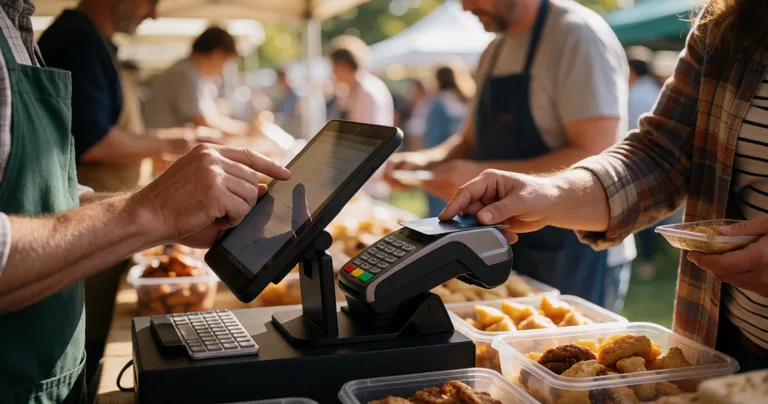
Vendors get a POS that runs on their own phone or tablet, works offline, and syncs with their storefront. Evntle Multi Device POS means a coffee cart with three staff can run three checkout points without three sets of hardware.
For food vendors, Evntle KDS (Kitchen Display System) and the order board keep queues moving by showing orders in real time — no shouting, no lost dockets.
For attendees: faster service, better discovery
Faster checkout is the obvious win. But the bigger opportunity is discovery. Evntle Event Discovery Platform lets attendees preview stalls before they arrive, plan their visit, and follow vendors they liked. That's how you turn a one-off market visit into a repeat customer.
Setting Up Affordable POS for Events: A Practical Checklist
Here's the sequence we recommend for organisers rolling out POS across a market or festival.
- Confirm connectivity per zone. Walk the site with your phone and test signal strength. Identify dead zones and plan offline-first workflows there.
- Set up vendor accounts in advance. Don't leave POS onboarding to bump-in morning. Get vendors set up at least a week before.
- Run a pre-event test. Every vendor processes a test transaction before event day. This catches 90% of issues.
- Train on the three most common scenarios. Normal sale, refund, and offline sale. That's it.
- Set up the live dashboard. As an organiser, know where to look for real-time sales visibility.
- Plan your reconciliation. Decide in advance how you'll reconcile cash, card, and any online sales at end of day.
Don't assume your venue has reliable mobile data. Even in metro Melbourne and Sydney, event-day network congestion can drop throughput to unusable levels. Offline mode isn't a nice-to-have — it's the difference between trading and not trading.
What to do when things go wrong
Every event has a moment where something breaks. The difference between a smooth event and a disaster is whether you have a plan. Evntle's Evntle Incident Management module lets organisers log issues, assign owners, and keep timestamped records for compliance — all from the same platform that runs your POS.
If you're running a food-heavy event, our guide to Best Food Queue Management Tools covers the operational side in more detail.
"We cut our end-of-day reconciliation from four hours to twenty minutes. That's not a software feature — that's a Saturday night back."
— Market organiser, South Australia
Frequently Asked Questions
Q: How much should I expect to pay for affordable POS for events?
A: For a single stallholder, expect $0–$50 per month plus transaction fees of roughly 1.5–2.5%. For organisers running multi-vendor events, event-specific platforms like Evntle typically bundle POS with vendor management, so you're comparing one subscription against three or four separate tools.
Q: Does POS for events work without internet?
A: It should. Any POS you consider for events must have full offline mode — not a limited fallback. Evntle POS processes sales offline and syncs automatically when connectivity returns, so vendors never stop trading.
Q: What's the best POS for a food truck at an Australian market?
A: The best POS for a food truck needs offline mode, a kitchen display system, and fast tap-and-go payments. Evntle POS plus the KDS and order board is purpose-built for this — see our POS System for Food Trucks and Events guide for the full breakdown.
Q: Can multiple vendors use the same POS platform at one event?
A: Yes — and they should. Evntle supports multi-vendor setups where each stall has its own POS instance but the organiser sees aggregate sales, stock, and performance data in one dashboard. That's how you get stall-level analytics without asking vendors for spreadsheets.
Q: How do I choose a POS for a recurring market?
A: Prioritise systems that handle repeat events without re-setup, track vendor performance over time, and support loyalty. Our guide to Choosing a Market Stall POS System walks through the exact criteria we'd use.
Q: Is cashless POS worth it for small market stalls?
A: Absolutely. Cash is now under 13% of in-person transactions in Australia, and cash-only stalls regularly lose sales to queue drop-off. Cashless POS pays for itself within a few events for most vendors.
Affordable POS for events isn't about finding the cheapest terminal. It's about choosing a system that eliminates the hidden costs — the reconciliation hours, the lost sales from slow queues, the vendor admin that eats your weekends. For Australian market and festival organisers, the smartest move is a single platform that connects stallholder bookings, POS, stock, and analytics. Evntle does exactly that, and you can start with a free account and see it working on your next event.
More from Evntle

Affordable Event Management Software for Small Events Australia
Find affordable event management software for small events Australia. Compare costs, features and POS options. Start free today.

All-in-One Event Platform for Australian Night Markets
Discover the best all-in-one event platform for Australian night markets. Streamline vendor management, POS, ticketing & compliance. Try Evntle today!
POS System for Food Trucks Australia: The Complete Guide
POS system for food trucks Australia — Compare features, costs & offline modes. Find the best POS for your food truck. Get started today.

Affordable Event Management App for Australian Festivals
Affordable event management app for Australian festivals. Vendor bookings, cashless POS, queue management, analytics. Start free today.
📋 Embed this feed on your website:
<script src="https://maylalabs.com/api/embed?api_key=mayla_site_f1cb1e95fff884263b19125c9f830c929bc45b4d&limit=5" defer></script>